



Knowing how to set a stop loss allows you to plan ahead to exit your position if the price moves against your expectations. This article explains how to set a Stop Loss in Bybit Futures, examples of long and short positions, and errors to avoid.
What is a stop loss order and how does it work?
What is a stop loss order?
A stop loss order is an order to terminate trading when the price reaches a preset condition. The purpose is to limit losses when the market moves unfavorably.
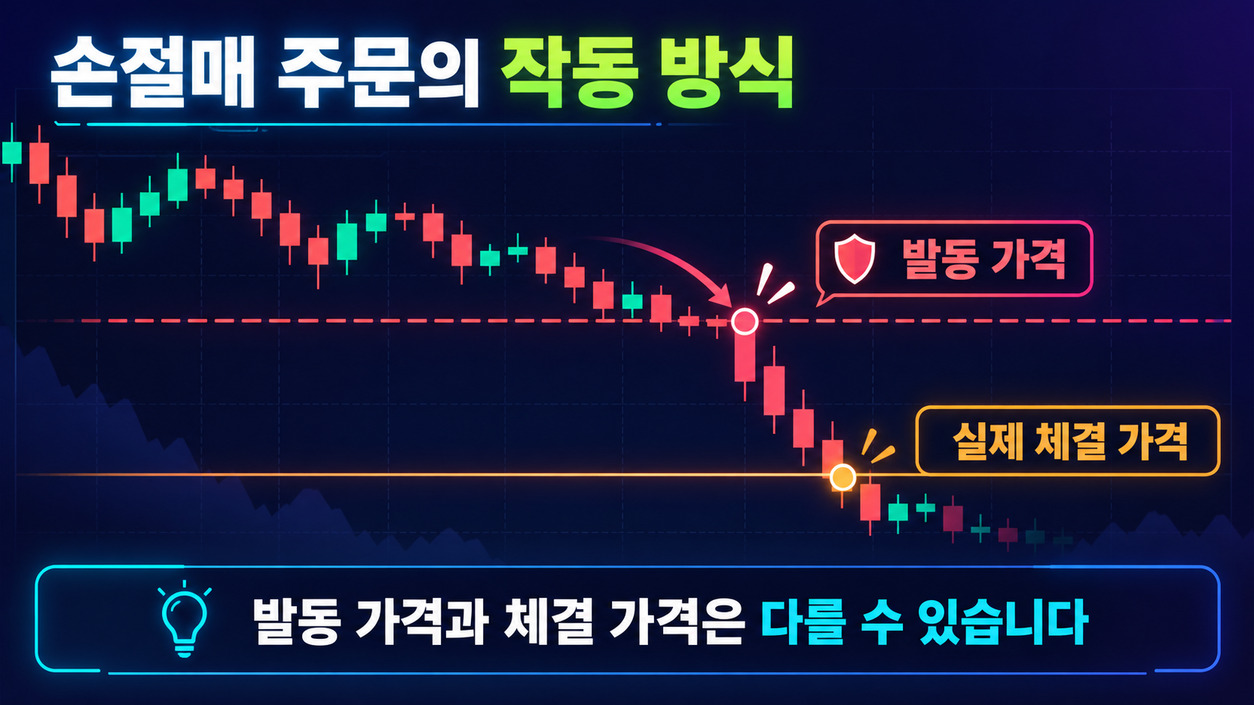
Using a stop loss order allows you to pre-determine the end point of your position and reduce emotional decisions. However, it is not guaranteed that the order will be executed exactly at the set price.
Stop loss point and trigger conditions
The order is triggered when the selected reference price reaches the preset condition. However, the trigger price and the actual execution price may not be the same. The execution price varies depending on market conditions and liquidity.
The stop loss point must be determined in the trading plan before entering the position. If the price fluctuates quickly, the actual execution price may differ from the stop loss standard.
Conclusion conditions and psychological responses may vary in simulated environments and real transactions. Before evaluating stop loss results 7 differences between simulated investing and actual investingIt is a good idea to look at it together.
Stop loss method and selection criteria
Common Stop Loss Methods
You can set a stop loss based on the rate of price change, or you can set a stop loss based on a price range where your trading decision is no longer valid.
Percentage standard: Set a stop loss standard at a certain percentage distance from the entry price and then check whether the interval is appropriate for price volatility.
Price structure criteria: Stop loss points are determined based on support, resistance, and trading time frames.
Stop loss criteria and stop loss ratio
Stop loss criteria include the point at which trading decisions become invalid, typical volatility, and the amount of loss you can tolerate.
Price-based Stop Loss Ratio = |Entry Price − Stop Loss Price| ÷ Entry price × 100%
For example, if you enter a long position at 60,000 USDT and set the stop loss standard at 59,400 USDT, the stop loss rate is 1%. This is a price interval and does not mean you will lose 1% of your account assets.
To convert the price interval into actual loss amount and loss ratio compared to margin, the position quantity must also be calculated. The relevant formula is What is a Coin Futures Calculator? Leverage, profit and loss, average entry price calculation methodYou can check it here.
How to set stop loss
The following procedure explains how to set a stop loss on an already opened position in Bybit Futures.
Open TP/SL menu for level 1 position
Go to Positions, find the position, and press + Add in the TP/SL column.
If you are checking multiple positions at the same time, check the contract name and long/short direction before operating.
Image source: Bybit.com
Step 2 Select Order Coverage
In Add TP/SL, select one of the following:
Entire Position: Applies to the entire position.
Partial Position: Enter the quantity you wish to end.
For example, if you hold 0.01 BTC and only want to close half, the expected quantity is 0.005 BTC. The remaining positions require separate management plans.
Step 3 Enter stop loss price and base price
Enter the Trigger Price in the Stop Loss field. In Reference Price, check the selected item among Last Traded Price, Index Price, or Mark Price.
For example, if you plan to enter a long position at 60,000 USDT and stop loss at 59,400 USDT, enter 59,400. This is an example figure and is not a recommended stop loss price for all trades.
The roles of Last Price, Index Price and Mark Price, and the price standard used to determine liquidation are What are Bitcoin futures? From trading methods to leverage and liquidationYou can check in more detail here.
Image source: Bybit.com
Step 4 Confirm Save and Review Order
Double-check price, quantity, and coverage before confirming. After saving, check whether the settings match the original plan.
Stop loss calculation for long and short positions
Calculating a stop loss order allows you to check your expected loss before committing. The following example assumes that the linear BTCUSDT contract is executed exactly at the stop loss price, and does not reflect commissions, funding costs, or slippage.
Example of long position stop loss settings
Enter a 0.01 BTC long position at 60,000 USDT and set Stop Loss at 59,400 USDT.
Expected loss = (entry price − exit price) × quantity |
Assumed loss amount: (60,000 − 59,400) × 0.01 = 6 USDT
Example of short position stop loss settings
Enter a 0.01 BTC short position at 60,000 USDT and set Stop Loss at 60,600 USDT.
Expected Loss = (Exit Price − Entry Price) × Quantity |
Assumed loss amount: (60,600 − 60,000) × 0.01 = 6 USDT
position | entry price | Stop Loss Price | quantity | expected loss |
long | 60,000 USDT | 59,400 USDT | 0.01 BTC | 6 USDT |
short | 60,000 USDT | 60,600 USDT | 0.01 BTC | 6 USDT |
This is the position loss amount based on assumptions and is not a loss ratio compared to the margin.
Stop Loss Principles and Errors to Avoid
If the trigger price or quantity is selected incorrectly
The basic principle of stop loss is to accurately check the price, quantity, and trigger conditions. You should avoid the following errors:
Enter the stop loss price in the Take Profit field.
You entered a number or decimal point incorrectly.
Select Partial Close while trying to close the entire position.
It only checks the price on the chart and does not check the reference price type set in the order.
Last Traded Price and Mark Price may be different. Therefore, you cannot determine that an order should be triggered simply because a certain price is displayed on the chart.
Please note that platforms may have different price sources and display standards. Aseonmo Market Standard: Understanding the rules of the game and preparing for a strategy testYou can also check it here.

If you do not reconfirm your order after setup
After changing the position quantity, check the Stop Loss setting again. Stop-loss strategies should be evaluated based on expected losses and compliance with the plan, not just the results of a single trade.
We do not expand the stop loss standard just because we expect a price rebound. If you want to adjust your plan, you will need to recalculate your risk before modifying your order.
Frequently Asked Questions
1. Can I set Stop Loss when opening a position?
possible. Bybit supports pre-specifying stop loss settings by selecting TP/SL in the order area.
2. Can the set stop loss price be modified later?
Changes may be made if the order status allows modifications. Opened positions can be checked in the TP/SL section of Positions.
3. Why is the order not triggered when the price reaches Stop Loss?
Compare the price type you are currently seeing with the base price of your order. If the order is set based on the Mark Price, the order will not be triggered simply when the Last Traded Price reaches the set value.
Setting a stop loss begins with accurately checking the price, quantity, and trigger conditions. You can practice the setup process on a demo trading account before using real funds.
0 Comments
No comments yet. Be the first to share your thoughts.